
When I am investigating a problem, a message saying that a method ran is rarely enough. I want to know the context: the execution step, relevant arguments and the data the method was processing.
Often that data already exists as a DTO. I do not want every call site to take it apart, invent another format string and decide how each property should appear in the log. I would rather make that decision once in the application’s logging adapter.
We will build the explanation around three parts: an application logging adapter, source-generated logging for fixed events, and the lower-level ILogger.Log<TState> method that lets us supply our own structured state. The aim is to keep useful context available as individual fields as well as a readable message.
Give the application the API it needs
A general-purpose logging library has to support many applications and many ways of logging. Your application has a more specific set of needs. An adapter can expose those needs and keep the broader library API inside its implementation.
Here is the sort of call I want the application to make:
applicationLogger.LogDebug(logEvent, methodName, blogPost);The application already has the event, method name and blog post. The adapter decides how to represent them for the logging system. If that underlying system changes, the adapter’s implementation can change while the application’s logging intent remains the same.
That is why I call this an application logger. Its API is for this application. Turning it into another generic logging library would reintroduce the broad surface we are trying to contain.
An adapter changes the interface presented to its caller. A decorator generally preserves the decorated interface while adding behavior. In this example, the application-facing methods are deliberately narrower than ILogger, so Adapter describes the purpose.
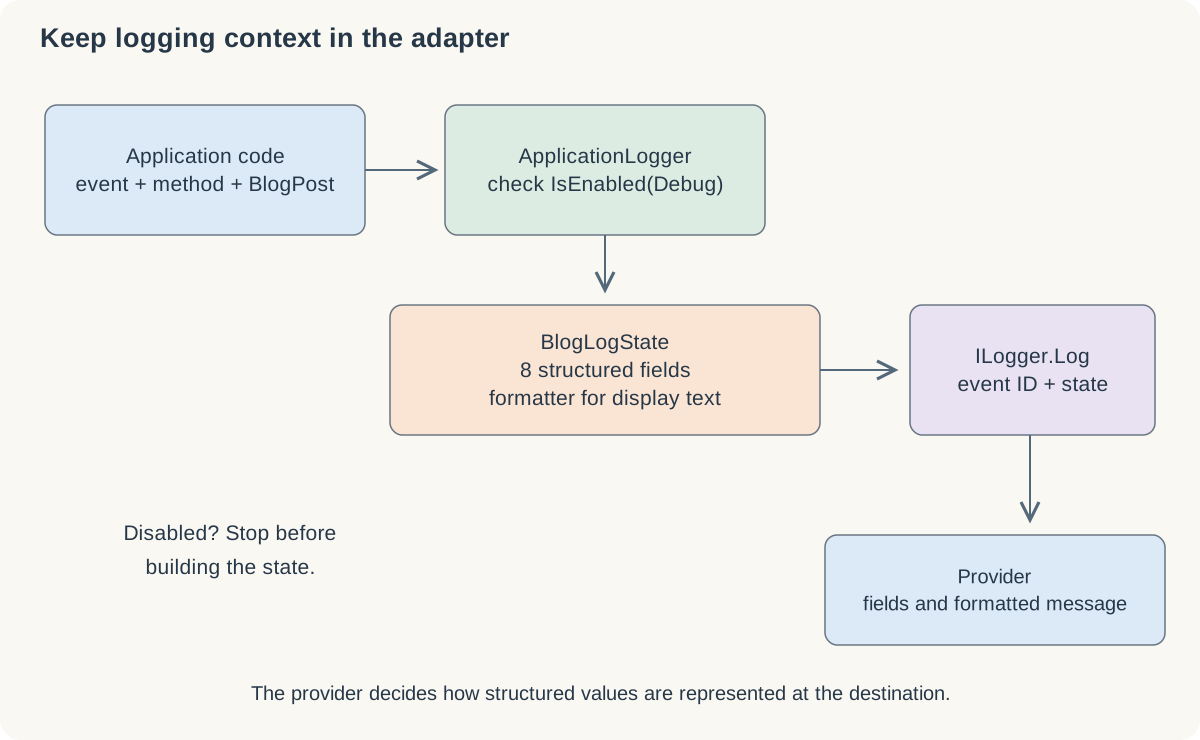
The adapter owns the representation of application context. A provider determines how that state appears in its destination.
What source-generated logging supplies
The sample also uses partial methods decorated with LoggerMessageAttribute. The generator supplies their implementation during compilation. The method signature gives us typed parameters, while the attribute describes the event, level and message template.
For example, this reduced illustration declares one fixed event:
internal static partial class BlogEvents
{
    [LoggerMessage(
        EventId = 42,
        Level = LogLevel.Debug,
        Message = "Processing blog post {Title}")]
    internal static partial void ProcessingPost(
        ILogger logger, string title);
}
The generated path avoids repeatedly doing some of the work associated with the general logging extension methods, including template processing and some boxing. Microsoft’s source-generation documentation explains the supported signatures and diagnostics.
The sample project targets net5.0, but references version 6.0.0 of the logging packages. LoggerMessageAttribute and this generator were introduced with the .NET 6 libraries. Check the package version as well as the target framework when identifying the available logging features.
Event identity is part of the logging design
I found the fixed event identity inconvenient for the way I wanted to use one application logging method from several contexts. Supplying another ordinary parameter called eventId did not make it override the attribute’s event identity. A parameter represented as structured data and the actual logging event ID are different things.
For a source-generated method representing one well-defined event, a fixed ID is useful. If the adapter’s contract needs to supply an EventId dynamically, the direct ILogger.Log call shown below gives it that control. Choose the method boundary according to what constitutes an event in the application.
The SkipEnabledCheck setting also needs careful reading. Its default is false: the normal generated method performs the enabled check. Setting it to true transfers responsibility for that check to the caller. Neither arrangement stops C# from evaluating method arguments before entering the method, so an expensive expression passed as an argument needs a guard at the appropriate call site.
In my historical experiment, I encountered an intermittent failure when using the Windows Event Log provider with the generated path. I did not establish a reproducible cause, and the same observation did not occur with every provider. That unresolved failure does not establish a general defect in source-generated logging.
Look at the lower-level method
Most logging calls use extension methods such as LogDebug or LogError. Underneath them is the generic method on ILogger:
void Log<TState>(
    LogLevel logLevel,
    EventId eventId,
    TState state,
    Exception? exception,
    Func<TState, Exception?, string> formatter);
The level says what kind of event this is. The event ID supplies its numeric identity and optional name. state carries the context, exception carries an exception when one is relevant, and formatter turns the state and exception into a display string.
There is no generic constraint requiring TState to implement a particular collection interface. The reason this example uses key/value pairs is the structured-logging convention understood by the providers we want to use. A provider can examine those fields instead of treating the state only as one opaque string. The API contract and a provider’s behavior are separate things to verify.
Turn the DTO into structured state
The original BlogLogState is a private readonly struct implementing IReadOnlyList<KeyValuePair<string, object?>>. Its constructor stores the method name and blog post, and prepares these fields:
| Field | Value supplied by the sample |
|---|---|
EventId |
Numeric value of the application’s event enum |
EventName |
Enum value formatted as a name |
MethodName |
Name supplied by the caller |
BlogPost.Title |
Blog title |
BlogPost.Content |
Blog content |
BlogPost.Date |
Blog date |
BlogPost.Categories |
Categories joined with commas |
BlogPost.Tags |
Tags joined with commas |
The key/value list gives the provider a stable set of field names. Count, the indexer and the enumerator expose those entries. Separately, ToString constructs the display message from the method name and blog fields, and Format delegates to it.
This separation is useful. A readable message helps a person scanning a trace. Individually named fields let the logging destination expose context as structured properties. In Application Insights, these properties appear as custom dimensions, so BlogPost.Title can be inspected separately from the formatted message.
The original example includes the entire content of the post. In an application, choose the relevant fields deliberately. A large body may add little diagnostic value compared with its title or identifier, and the formatter and structured fields should agree about the snapshot being recorded.
Check the level before constructing that state
Here is the original adapter method:
public void LogDebug(LogEvent logEvent, string methodName, BlogPost blogPost)
{
    if (_logger.IsEnabled(LogLevel.Debug))
    {
        var blogLogState = new BlogLogState(logEvent, methodName, blogPost);
        _logger.Log(
            LogLevel.Debug,
            new EventId((int)logEvent, logEvent.ToString()),
            blogLogState,
            exception: null,
            BlogLogState.Format);
    }
}
If debug logging is disabled, the adapter avoids constructing BlogLogState. In this example, that also avoids building its list and joining the category and tag arrays. The caller has already supplied a BlogPost; the guard does not undo work done to construct that argument before this call.
The EventId passed to Log is the actual event identity. The EventId key inside the state is an additional structured field. They have related values here, but occupy different parts of the logging contract.
A struct does not make the operation allocation-free
KeyValuePair and EventId are structs, which makes them value types. That alone does not establish where every instance is stored or whether a logging call allocates. Their physical storage and the allocations of the surrounding operation still need examination.
BlogLogState contains a List<KeyValuePair<string, object?>>, which allocates storage. The integer event ID and DateTime assigned to object? values require boxing. Joining arrays creates strings. The iterator used to enumerate the state and formatting the display message can also allocate.
The readonly declaration does not make all the data deeply immutable. The original BlogPost is itself a struct, copied into the state, but its category and tag arrays remain shared references. The structured list joins those arrays during construction; the formatter joins them again later. If the arrays change before a provider formats the message, the two representations can diverge. Establish snapshot ownership if the provider retains state for later processing.
The benefit here is control over the application API, enabled-level work and structured representation. This example includes no benchmark establishing that the hand-written DTO state is faster than every generated alternative.
Verify the destination as well as the call
The destination should expose the blog fields as separate structured properties alongside the formatted message. For the sample state, that means fields such as MethodName and BlogPost.Title remain individually accessible. That gives us useful context without taking the DTO apart at every application call site.
Test that behavior with the provider you actually use. Check the level, actual event ID, field names and formatter output, and make sure the disabled path does not do the expensive preparation you intended to avoid. An adapter makes those choices local enough to inspect and test.