
A web request may spend most of its lifetime waiting for a database, a file, or another service. If its server thread waits with it, that thread cannot handle another request. C#’s async and await let us express the operation in a familiar sequence while giving the thread back during an asynchronous wait. The benefit shows up when the system handles many such waits, not necessarily when one person times one request.
I will use a concrete case throughout: an ASP.NET MVC page that gathers video lists for three members from a remote service. The older IIS and classic ASP.NET request path explains what happens to a server thread during those calls. The code examples use current .NET APIs, but the questions have not changed: which operations wait, which ones depend on each other, and what happens when many people request the page at once?
What is waiting for what?
A CPU-bound operation needs processor time to calculate a result. More cores can help when the calculation can be divided into independent pieces. An I/O-bound operation asks something else to do work or deliver data. Reading a file, calling an HTTP service, and querying a database all involve I/O. The CPU still does work before and after the request, but much of the elapsed time may be spent waiting for the response.
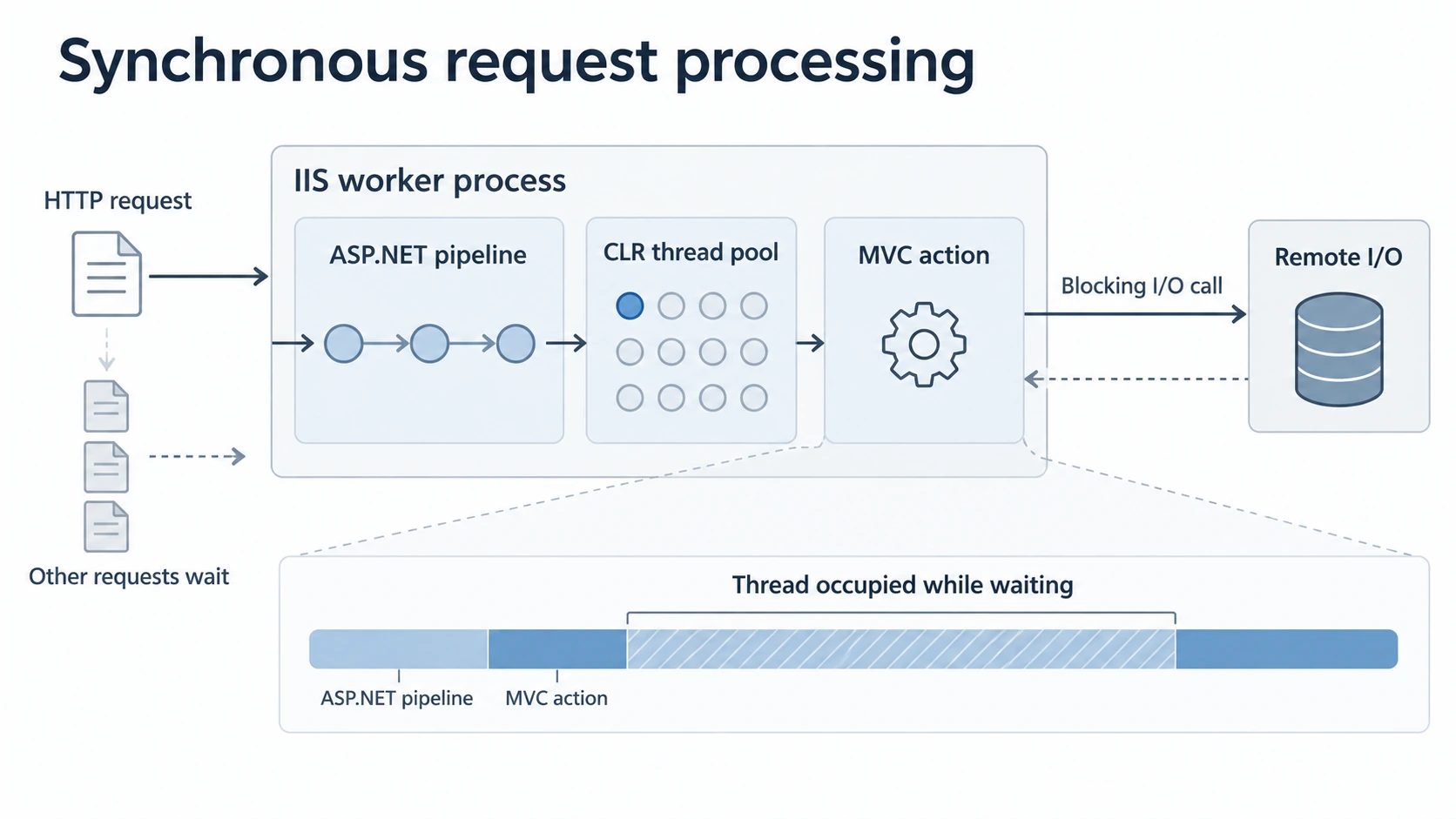
Imagine that fetching one member’s video list takes about half a second. A synchronous call occupies its calling thread for that half second. Starting three such calls one after another occupies the thread for roughly a second and a half. If a web server receives many requests like this, threads accumulate in waits instead of processing new requests.
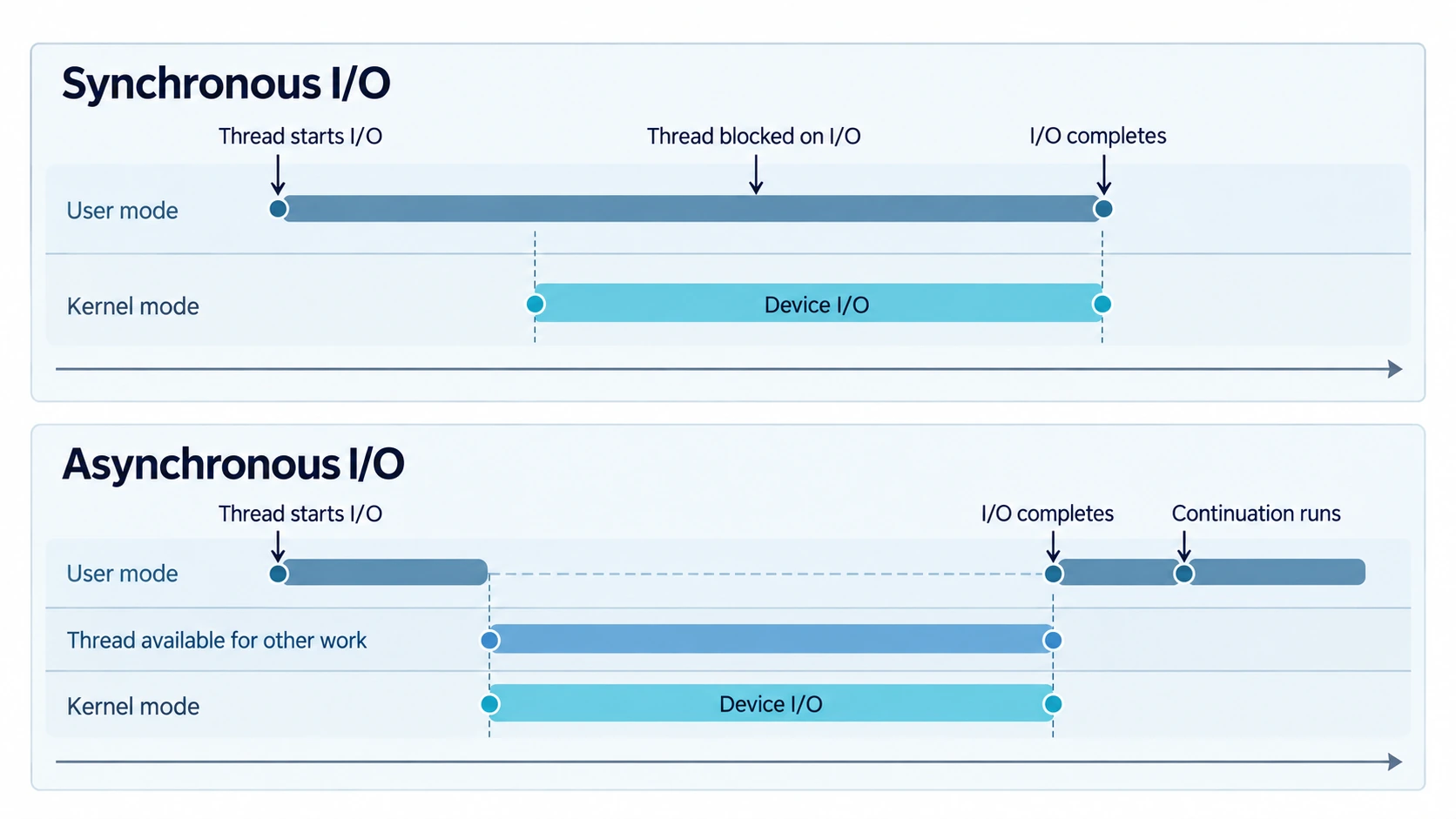
An asynchronous I/O call can return control while the operation is pending. The method resumes when the result is available. On a desktop application, this leaves the UI thread free to handle input. On a server, it allows a worker thread to process another request. There is no rule that every asynchronous operation owns a background thread. The API and platform determine whether the underlying I/O uses an operating-system completion mechanism or thread-pool work; async by itself creates neither a new thread nor a faster network.
The distinction is between elapsed time and occupied resources. A remote service still has to respond. One request may take about as long as it did before, and an asynchronous method has some bookkeeping of its own. Under concurrent load, the server can use its threads more effectively. I reach for async I/O chiefly to improve capacity and throughput, then measure whether this particular application actually scales better.
Here, scaling means making effective use of added capacity. A CPU-bound calculation may benefit from more cores if its work can be divided. An I/O-bound server must be able to keep its I/O subsystem busy without filling its worker pool with idle waits. More hardware will help only when the software can use it and another dependency does not become the limit. Compare throughput and response times as demand rises, then repeat after a capacity change. An async keyword alone cannot establish that result.
Follow a request through the wait
Start with the route a request takes through IIS before it reaches an MVC action. The boundary between user mode and kernel mode separates application code from the operating system’s privileged I/O work. Keep two different kinds of waiting in mind as we follow the request: the HTTP request waiting for its response and a worker thread blocked on an I/O call.
Why the user/kernel boundary matters
The ASP.NET application runs in user mode, where a process has its own protected address space. Windows components that manage devices and I/O run in kernel mode with greater privileges. When application code asks the operating system to read a file or use a network device, execution crosses that boundary. A mode transition is not the same thing as a scheduler switching from one thread to another. Both can have costs; here I am interested in the repeated trips between privileged I/O work and user-mode web-server code. Microsoft’s explanation of the two modes describes the isolation they provide.
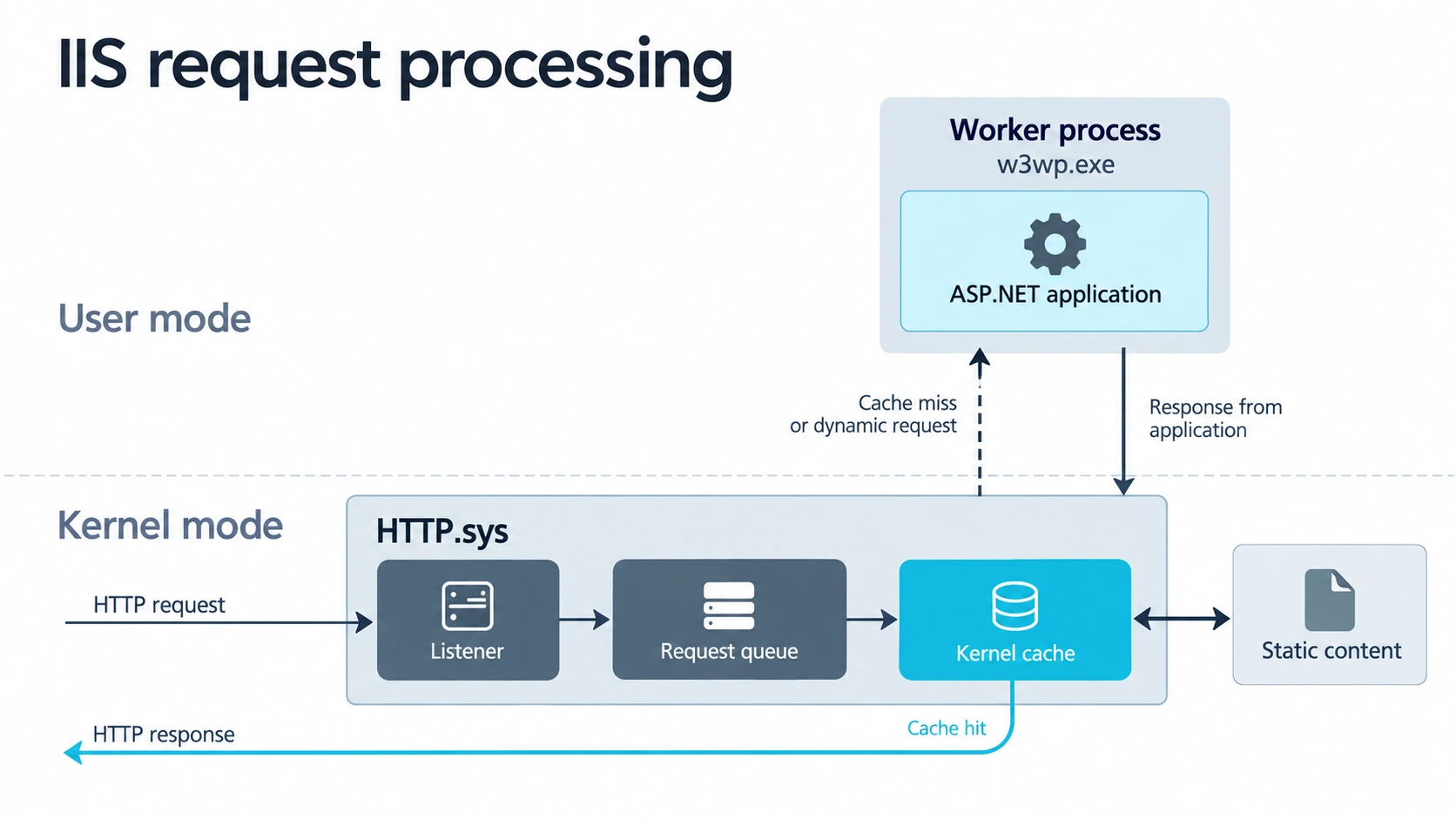
Consider the simplified path for serving a static file through a user-mode web server without a usable kernel cache entry:
- The network subsystem receives the request in the kernel.
- The request reaches the user-mode server, which decides what file to serve.
- The server asks the operating system to read that file; the file I/O passes through the kernel.
- The server receives the data in user mode and sends the response through the kernel’s network path.
That route crosses the line repeatedly because the server participates in both deciding what to serve and returning it. A response handled earlier in the path avoids application work and some boundary crossings. Kernel code does not become faster merely by virtue of running with more privilege.
IIS 6 introduced the kernel-mode HTTP listener HTTP.sys. It receives HTTP requests, manages queues for application pools, and can serve an eligible response from its kernel cache without passing that request through user-mode application code. IIS 7 added a more configurable output-cache model while retaining HTTP.sys. A cache miss, an ineligible response, or dynamic application work still needs a worker process. The first response also has to be produced before it can be cached. Microsoft’s IIS architecture guide and output-caching guide document those boundaries.
Where the ASP.NET application runs
For a request that needs the MVC application, HTTP.sys routes it to the appropriate application pool. The worker process, w3wp.exe in full IIS, runs in user mode and executes the IIS and ASP.NET pipeline. Older IIS versions connected ASP.NET through an ISAPI extension with separate native IIS and managed ASP.NET request pipelines. IIS 7’s integrated mode made native and managed modules participants in one request pipeline. That removed duplicated pipeline stages and let managed handlers take part more directly, but it did not move the MVC application into kernel mode. Microsoft’s integrated-pipeline history describes this change.
Now suppose the MVC action calls a remote service. The request is still open, and ASP.NET needs the service’s answer before it can render the page. There are two ways the wait can occupy server resources:
| Point in the request | Synchronous I/O | Asynchronous I/O |
|---|---|---|
| Start the remote call | A worker thread enters the call. | A worker thread starts the operation. |
| While the service responds | The thread remains blocked and unavailable for another request. | The action is suspended; the thread returns to the pool for other work. |
| When the response arrives | The blocked thread continues. | Completion makes the action’s continuation eligible to run on an available thread. |
| Finish the response | Application code processes the data and responds. | Application code resumes, processes the data, and responds. |
The client’s HTTP request remains outstanding in both cases. Returning the worker thread to the pool does not complete the request or shorten the remote service’s work. It changes how many other requests the server can process during that interval. The continuation need not run on the original worker thread; the request’s logical state is what survives the wait.
How completion gets back to the application
Windows I/O completion ports help make the asynchronous path possible. A program can initiate supported asynchronous I/O and arrange for completion to be reported later. A pool thread handles the completion and the application continues when its awaited operation is ready. That allows many pending operations to share a much smaller number of active threads. Windows’ completion-port documentation explains the queue of completion notifications and the threads that service it.
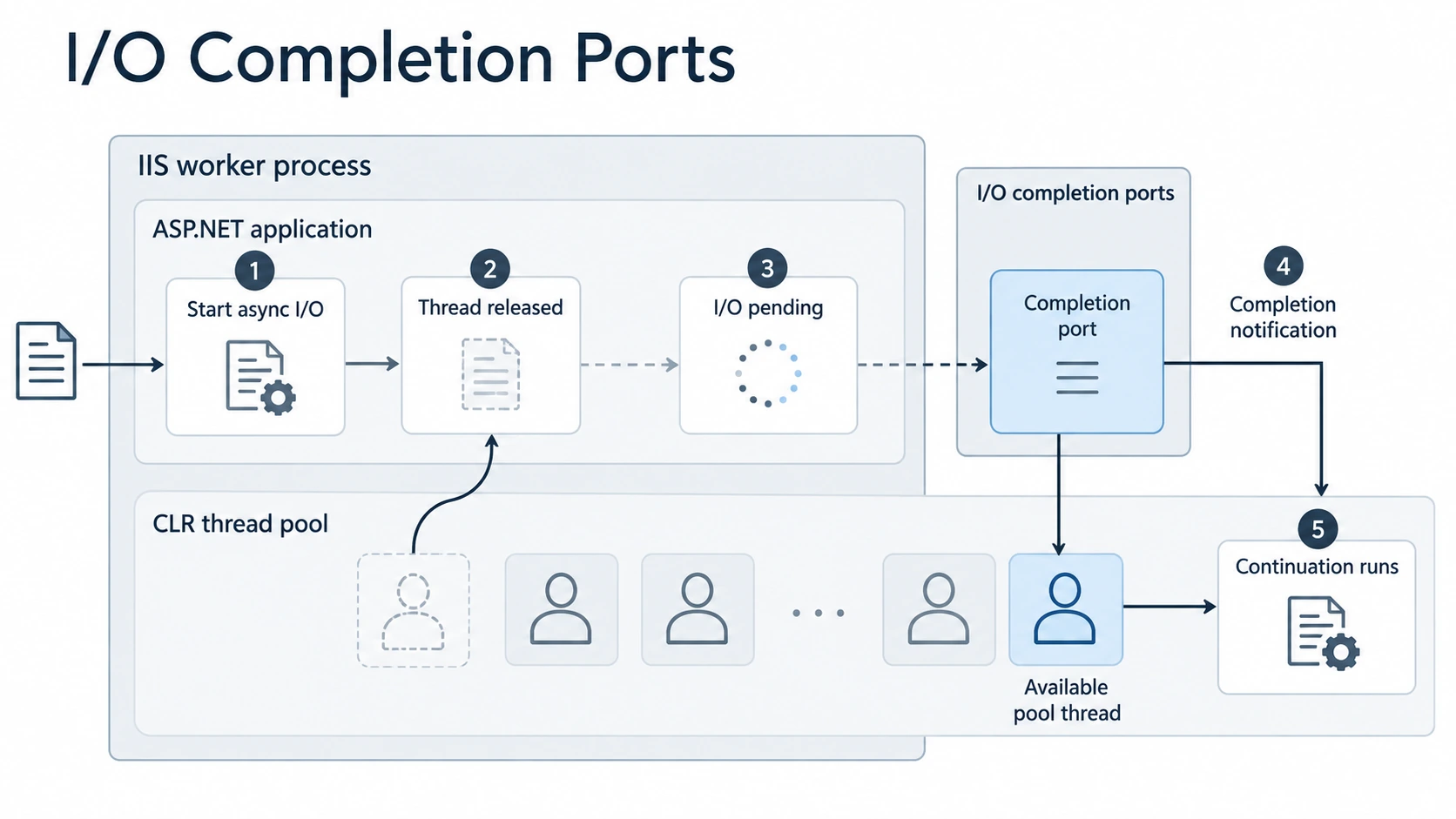
Think of an aircraft circling while it waits to land. The flight remains active, but the runway crew is not assigned to stand idle for its entire wait. That is how I picture an outstanding HTTP request while its application awaits remote I/O. The analogy stops there: HTTP.sys has request queues, while a completion port delivers notifications that asynchronous I/O has finished. The native and managed parts of the pipeline can hand a response back without reserving the same physical threads for the request’s entire lifetime.
These IIS details serve the article’s central point. Kernel caching can bypass user-mode processing for suitable responses. For dynamic work that must reach the application, async I/O can avoid occupying a worker thread during a remote wait. It does not eliminate the user/kernel transitions needed to perform I/O. Classic ASP.NET and modern ASP.NET Core differ in their hosting pipelines, but both must answer the same resource question: does application code block a thread while waiting for I/O?
Why async and await changed the code we write
Asynchronous I/O existed before C# 5. Consider a small download using the older Asynchronous Programming Model, whose methods came in Begin/End pairs. To fetch a response and read its body, I have to start the request, provide a callback, call the matching End method inside it, start a read, provide another callback, call its End method, and repeat until no bytes remain. I also have to manage completion so the application does not exit while callbacks are still pending.
Those callbacks represent real stages of the work, but they separate a simple reading order across nested pieces of code. With await, I can write the same stages in their natural order: get the response, read the body, process it. The compiler writes the machinery that resumes the method after each incomplete operation.
Here is an illustrative version using current .NET APIs. The two awaits correspond to receiving response headers and reading the body:
public static async Task<string> DownloadMemberVideosAsync(
    HttpClient client,
    Uri uri,
    CancellationToken cancellationToken)
{
    using HttpResponseMessage response = await client.GetAsync(
        uri,
        HttpCompletionOption.ResponseHeadersRead,
        cancellationToken);

    response.EnsureSuccessStatusCode();
    return await response.Content.ReadAsStringAsync(cancellationToken);
}
GetAsync returns a Task<HttpResponseMessage>. Awaiting it produces the response when that operation completes. ReadAsStringAsync returns a Task<string>; awaiting that produces the text. The method’s signature is Task<string> because its caller receives a task representing the eventual string. Inside the method, the return expression is the string itself. The compiler packages its successful completion into the returned task.
The first await may suspend the method while headers are pending. The second may suspend it while the body is read. If a task has already completed by the time it is awaited, execution can continue without suspending. Code before the first incomplete await also runs as part of the original call. Marking a method async does not automatically move all of its code elsewhere.
The response is disposed when the method completes, including when reading fails. The caller owns and reuses the HttpClient. A real gateway would interpret the response and map it into the application’s own models rather than let HTTP details spread into domain code. For a large body that should be processed incrementally, read a stream instead of collecting the whole response into one string.
What a task tells the caller
A Task<T> represents an asynchronous operation that may be pending, completed, canceled, or faulted. It is not a synonym for a thread. await lets the caller obtain the T without blocking a thread while an incomplete operation runs. It also delivers a failure or cancellation through the normal control flow of the awaiting method.
For methods with no result, return Task. Use the Async suffix so callers can recognize the contract. The language permits async void, principally for event handlers whose signatures require void; ordinary callers cannot await such a method. When an asynchronous method only forwards an existing task and has no work to do after it completes, it can return that task directly without its own async and await.
Carry the asynchronous path through the application
The remote download sits at the end of a call chain. The controller action calls a method that gathers member video lists; that method calls the HTTP download. Converting only the last method leaves its callers holding tasks that they must handle. DownloadMemberVideosAsync returns Task<string>, so a gathering method must await it or return a task of its own. The controller must in turn await the gathering method before it can pass completed data to the view.
A typical path is:
HTTP action -> application orchestration -> gateway -> remote I/O
     await             await             await
The actual I/O occurs at the gateway. Higher layers use await to preserve the sequence of their own work while allowing the wait to pass through the whole request. In classic ASP.NET MVC, the action changes from returning ActionResult to returning Task<ActionResult>. A modern ASP.NET Core action would normally return Task<IActionResult> or a typed asynchronous result. The useful rule is to avoid forcing an unfinished task back into a synchronous call chain with .Result or .Wait(). Those calls block a thread and can also deadlock in contexts such as a UI thread or classic ASP.NET.
The same composition appears in a business workflow: validate file information, extract metadata from a file, validate that metadata, create a database record, find stakeholders, send a notification, and process the file. These steps do not all have the same cost or the same dependency relationship. Validation of data already in memory is ordinary CPU work. File access, database calls, and a message sent to another service may be asynchronous I/O. The orchestrating method can await each I/O step where the next step needs its result, while keeping its business order readable. Making the whole call chain asynchronous does not mean every individual statement performs I/O.
Four ways to fetch three video lists
Return to the MVC page. It downloads video lists for three members from a remote service and renders them in a view. I time the data retrieval separately from view rendering and the browser’s image downloads. Without that boundary, the numbers would describe more than the code I am comparing.
With calls that each take roughly half a second, these four versions behave differently:
| Version | How it starts the three calls | Approximate elapsed time for one request | Cost while waiting |
|---|---|---|---|
| Sequential synchronous | Finish one call before starting the next. | About 1.5 seconds | One request thread stays blocked. |
| Parallel synchronous | Run blocking calls on separate worker threads. | About 0.5 seconds | Several threads can be blocked per request. |
| Sequential asynchronous | Await one call before starting the next. | About 1.5 seconds | The request thread is released during each wait. |
| Concurrent asynchronous | Start all three I/O calls, then await them together. | About 0.5 seconds | No dedicated application thread is needed for each pending call. |
The approximate times show the shape of the work; network and service delays decide the real numbers. The table also shows why “async” and “concurrent” answer different questions. Awaiting one request before starting the next makes efficient use of a thread during each wait, but preserves a sequential schedule.
The easy mistake looks like this:
foreach (Uri uri in memberUris)
{
    string json = await DownloadMemberVideosAsync(
        client, uri, cancellationToken);
    // The next request has not started yet.
}
If the calls are independent, start them first and await the group:
public static async Task<string[]> DownloadAllMemberVideosAsync(
    HttpClient client,
    IReadOnlyList<Uri> memberUris,
    CancellationToken cancellationToken)
{
    Task<string>[] pending = memberUris
        .Select(uri => DownloadMemberVideosAsync(
            client, uri, cancellationToken))
        .ToArray();

    return await Task.WhenAll(pending);
}
ToArray() enumerates the URLs now, so each call starts before WhenAll is awaited. The returned array follows the order of memberUris, even if a later request finishes first. If I appended results in completion order instead, I could put one member’s videos into another member’s row. Task.WhenAll keeps that mapping and waits asynchronously for all the tasks; Task.WaitAll blocks.
Starting many independent I/O operations together still creates demand on the remote service. Three calls are manageable. An unbounded collection of thousands calls for a concurrency limit, timeouts, and a cancellation policy. If one request depends on data from another, await the prerequisite first and start only the independent branches together. The goal is to express the real dependency graph, not to make every operation concurrent.
When the first answer is enough
Task.WhenAny solves a different problem. It returns when one supplied task completes and gives you that task. You then await the returned task to obtain its result or observe its failure. “First completed” is not the same as “first successful.” The remaining operations continue unless you cancel them or otherwise arrange their lifetime. Their side effects and failures still matter.
That makes WhenAny suitable only when the application can legitimately use one completed answer and has a plan for the others. WhenAll is the natural choice when the page needs all three members’ lists.
Why the faster single request was misleading
My first attempt at concurrency used Parallel.ForEach around three blocking calls. One page’s data retrieval fell from roughly a second and a half to roughly half a second. That result is attractive until requests arrive concurrently. Each web request can now occupy multiple threads while its remote calls wait. Under a rapid sequence of requests, IIS Express stalled. A thread waiting synchronously on I/O remains unavailable to the next request, even when several such waits began in parallel.
I then used ApacheBench to apply more controlled request counts and concurrency. The observations varied with warm-up, thread-pool behavior, and the state of the development server. The asynchronous version, after overlapping the three I/O calls with WhenAll, handled those tests more consistently. I would not turn a local development-server result into a throughput guarantee for another machine.
For a more structured comparison, I built separate web and load tests for the synchronous and asynchronous actions in Visual Studio. One run simulated 50 users for 1,000 iterations. It reported about 8.25 pages per second for the synchronous action and 8.44 for the asynchronous action. The request counters were about 132 and 140 per second; the page includes additional requests such as images. Those margins are small. The load generator and server ran on the same machine, and other runs differed. I cannot turn those figures into a claim that async always doubles throughput, or even that this particular application gained a large amount.
A useful comparison holds the workload and environment steady, warms the system consistently, and records at least throughput, response-time distribution, thread-pool pressure, outbound connections, and downstream service load as concurrency increases. Include the time clients spend between actions if that reflects real use. Run the load generator separately when its own CPU or network use could distort the server measurements.
Consider a video service that blames high-bandwidth customers for congestion. Load testing may reveal the opposite pressure: slow connections keep downloads active for hours and dominate the number of simultaneous transfers. The rate at which requests arrive is only part of load; how long each one remains active matters too. Model client bandwidth and response sizes when those affect the system you are measuring.
Choose async I/O, parallel CPU work, or a separate worker
Use asynchronous APIs where the application waits for a file, database, remote service, or broker and where that wait constrains responsiveness or capacity. An Async suffix is not enough evidence. The implementation underneath must support useful asynchronous behavior. For CPU-bound calculations, await does not remove the need for processor time. Suitable independent computation can use parallel execution, subject to available cores and contention.
Some work does not belong in the request at all. Notifications, logging, document processing, and lengthy calculations may belong in a separate process. If a response need only confirm acceptance, the web application can send a message to a durable queue and let a worker perform the later work. That changes the contract: acceptance is not completion, and the design must say how delivery, retries, failures, and status are handled. Work whose result is required for the response still belongs on the awaited path.
Avoid wrapping a synchronous I/O call in Task.Run on a web server merely to give it an asynchronous-looking signature. The blocked call will occupy a thread-pool thread anyway, and the extra scheduling does not create nonblocking I/O. Mixing .Result or .Wait() into an asynchronous path has the same resource problem and, in some environments, a deadlock risk.
Better throughput can move the bottleneck
That brings us to the “thundering herd” problem. Picture several web actions calling a service that calls a database. The web tier is initially slow enough to limit how many calls reach the service. Making its I/O asynchronous may let many more calls pass through at once. The service or database, previously comfortable, can now become the queue.
A change that improves the first tier must therefore be tested against the full path. Check connection-pool limits, database capacity, remote-service quotas, queue depth, and failure behavior as concurrency rises. Apply bounded concurrency or backpressure where the next tier cannot absorb unlimited demand. Moving the wait away from web threads is useful, but it does not create capacity in the systems behind them.
Why the debugger still reads top to bottom
The compiler turns an async method into a state machine. At an incomplete await, it preserves the method’s state, arranges a continuation, and returns control. When the awaited operation completes, execution resumes after that await. This is why stepping through the source can feel like stepping through a synchronous method even though the thread was free to do other work between those lines.
An iterator is a useful mental model. The compiler preserves state across both yield return and await, though different events resume them. This small iterator makes the suspension visible:
static IEnumerable<int> GetNumbers()
{
    yield return 1;
    yield return 2;
}
The first request for an item runs to yield return 1 and gives the caller that value. The next request resumes after that line and reaches yield return 2. In an async method, an incomplete await is likewise a suspension point, but completion of the awaited operation makes the continuation ready. The caller does not have to write either state machine by hand. More generated code does not itself tell you whether the asynchronous version is faster or slower; the workload and measurements do.
That iterator connection leads to C# 8 - Async Streams. A method can await I/O and still return a completed collection only after collecting every item. Async streams combine asynchronous waits with incremental iteration, so a caller can process one result while later results are still pending.