
What Is an Eval? A Worked Example
In Verified, Not Trusted: Expense Analysis, Part Three, I ran an eval suite against an expense-analysis prompt and showed the results. What I didn’t do is stop and explain what an eval actually is, what its parts are called, and how you decide what to check and how to check it. This article does that, using a handful of lines from the same expense log.
By the end you should be able to look at your own prompt, skill or workflow and answer three questions: what has to be right, how will I check it, and how often does it have to be right before I rely on it?
We will build those checks from six expense situations, then compare a written report with a structured workflow result. The workflow sections show why the output’s shape changes what code can grade. The full implementation walkthrough is in Part Two; here we follow the checks.
One run cannot establish reliability
Here is why evals exist at all. The same prompt, on the same model, with the same expense log, got the August travel total right in four out of five runs. The reference accepts $1,655.92 with the August 16 Uber in Travel, or $1,631.82 with it in Transport. In the remaining run it reported $1,219.22. The log has two Delta Air Lines charges on August 14, and in that run the model decided the $412.60 charge was a duplicate of the $450.60 one and left it out. That run also put the August 16 Uber in Transport, so its travel total was $1,631.82 minus $412.60: $1,219.22.
If you had run it once and seen $1,655.92, you would have trusted it. If you had run it once and seen $1,219.22, you might not have noticed. Neither single run tells you how the prompt behaves. In these five runs, the check passed four times: an observed pass rate of 80%. That is a measurement, and an eval is how you take it. Five runs are a useful start; they do not establish the failure rate on every future input.
The vocabulary
The industry uses a handful of terms for the parts of an eval. They are simple once you see them side by side.
| Term | What it means here |
|---|---|
| Task | One input with a known correct outcome: the expense log and the budget note, and the job “analyze my spending”. |
| Run | One attempt at the task, starting fresh, sharing nothing with any other run. Some people call this a trial. |
| Output | What the run produced: a written answer, or structured data, or both. |
| Reference key | The hand-checked correct answer: every line’s date, merchant, amount and category, and every total that follows from them. |
| Check | One property of the output that must be right, such as “July shopping is $756.72”. |
| Grader | Whatever decides whether a check passed: a piece of code, a model, or a person. |
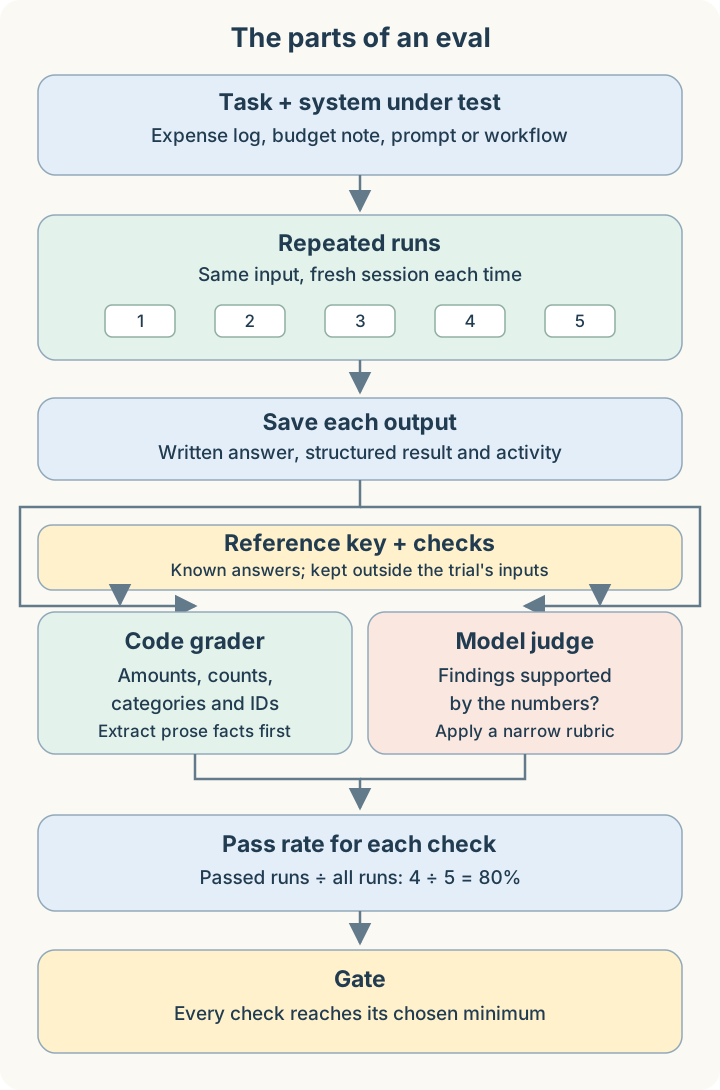
| Pass rate | How many runs passed a check, divided by how many runs there were. Four out of five is 80%. |
| Minimum pass rate | The pass rate a check must reach. If every check reaches its minimum, the eval passes. This is often called the gate. |
So an eval is this: run the task many times, grade each output against the reference key with a set of checks, and see whether every check passes often enough.
Three kinds of grader
The grader is where most of the thinking goes. There are three kinds, and choosing between them is the most important decision in an eval.
Code. A function compares the output with the reference key. Is the number within one cent of $212.74? Is the count of uncategorized lines 8? Did the tool log show that Python actually ran? A deterministic code grader is precise, fast and inexpensive, and gives the same verdict for the same input. Use it whenever the property can be read and compared mechanically.
A model, usually called an LLM-as-judge. A second model reads the output and applies a written rubric: a short document that says what passes and what fails. Use it only for properties code cannot decide, such as “each of the three findings is supported by the numbers”. A judge is itself a model, so its verdicts vary too. Give it the reference facts in the rubric, keep the rubric narrow, and check its verdicts yourself now and then.
A person. A human reads the output. A person can assess judgment calls and spot errors in the reference or rubric, but human graders can disagree too. This takes time. In practice its main job is to check the other two: reading a sample of outputs to confirm the code and the judge are grading what you think they are.
There is also a combination worth knowing. When the output is prose, code can’t easily find “the August travel total” in it. Part Three solved this by having a model read the answer and fill in a fixed form (August travel: 1655.92; duplicate flagged: yes), and then code compared the form with the reference key. The model only extracts. Code decides.
Eight lines, six situations
Here are eight real lines from the log. They cover six situations that an expense analysis has to get right.
31   Local Coffee Co - 34.22 (2026-06-12)
108  Return processed - REI (7/18/26) - -$68.00
111  Trader Joe's (Jul. 22) - $54.12
112  Trader Joe's (Jul. 22) - $54.12
117  ATM Cash Withdrawal - $30.79 (Jul. 29)
167  Delta Air Lines - $412.60 (Aug. 14)
168  Delta Air Lines (8/14) - $450.60
173  Uber, August 16 -- $24.10
For each one, ask the same three questions: what is the right answer, what could go wrong, and how do I check it?
1. An ordinary purchase (line 31). Local Coffee Co, $34.22, belongs in Dining & Coffee for June. Before anything else, the line has to be read correctly: the date, the merchant and the amount, with the sign kept when there is one. Then it has to go in the right category. A model can get any of that wrong, or skip the line. One GPT-6 Luna answer reported June dining as $178.52 instead of $212.74, a gap equal to this line’s $34.22. That points to a candidate cause, not a proven omission: the saved execution read this line as negative and calculated $144.30 for June dining. The final answer and that calculation disagree; the final total alone cannot establish which step caused the reported $178.52.
Ideally you verify every line: each one read correctly and put in the right category. Whether you can depends on what the output shows you. A prompt’s answer is a written report with tables of totals, and the model’s line-by-line reading never appears in it. All you can check is the totals. A wrong total tells you something went wrong in parsing, categorization or calculation. The reference key lets code search for likely line-level causes, but the total alone cannot prove which line was wrong. Several errors can also cancel out and leave the total correct. But a total only covers its own lines. The prompt eval checks five totals, so a grocery or gas line read as $45.18 instead of $54.18 would never be caught.
The workflow from Verified, Not Trusted: Expense Analysis, Part Two returns every line it read, with its date, merchant, amount, category and whether it was counted. When the output shows every line, check every line. That check is code comparing 198 lines with the reference key, and it is the strongest check in the suite.
2. A duplicate (lines 111 and 112). The same Trader Joe’s charge appears twice on July 22. For this fixture, the author confirmed that it is one duplicated purchase, so it should be counted once. Identical text alone does not establish that for a new log. The check is a yes or no fact, “the duplicate is flagged”, and code compares it with the reference key.
3. Two charges that look like duplicates but aren’t (lines 167 and 168). Same airline, same day, different amounts. The log gives no reason to discard either charge, so both must be counted. It does not establish how many flights they represent. This is the failure from the opening. Code checks “both Delta charges are kept” and the August travel total.
4. A refund (line 108). The REI return is minus $68.00. It should reduce July shopping, not add to it. Code checks that the refund was netted, and the July shopping total confirms it.
5. A transfer you can’t categorize (line 117). An ATM withdrawal says nothing about what the cash bought. The right answer is to leave it uncategorized, not to guess. Code checks that all eight transfers and withdrawals in the log are left uncategorized.
6. A line with two acceptable answers (line 173). An Uber ride on August 16, alongside the travel charges, could be Travel or Transport. Both are defensible, so the reference key accepts both, and the August travel check accepts either $1,655.92 or $1,631.82. A reference key is allowed to say “either of these is correct”. What it must not do is accept anything.
Notice that every one of these is checked by code. Each has one accepted answer, or a short list of accepted answers, and a number or a yes or no that code can compare.
Now the part code can’t do. The task also asks for “the three things you’d most want me to know about my spending”. Whether a sentence like “Shopping has stayed at or under $1,200” is supported by the numbers is a judgment. That check goes to a judge with a rubric. The rubric lists the reference facts and says, in short: pass if there are exactly three findings and none contradicts the answer’s own tables or the reference facts; fail otherwise. In the prompt eval, a judge failed an Opus run for exactly that sentence, because the same answer’s table showed August shopping at $1,218.31.
Verified, not trusted: what to check in this task
Put those together and you get the list of things in this task you should not take on the model’s word:
| Don’t trust that… | Verify by checking… | Grader |
|---|---|---|
| every line was read correctly | each line’s date, merchant, amount and sign; the totals when lines aren’t visible | code |
| each line is in the right category | each line’s category; the totals when lines aren’t visible | code |
| transfers and withdrawals were left alone | the count, and each entry’s category when the ledger is available | code |
| the duplicate was removed and the look-alikes kept | the duplicate fact, both Delta charges, the travel total | code |
| the refund was netted | the refund fact and the July shopping total | code |
| only the two stated budgets were used | which budgets the answer compares against | code or judge |
| the findings agree with the numbers | exactly three findings, none contradicting the tables | judge |
The prompt in Part Three asked the model for every one of these things in plain words. Don’t force transfers into a category. Use code for the arithmetic. Give exactly three findings and check each against your tables. The eval still found runs that did otherwise. That is what I mean by “an instruction is not assurance”: the instruction raises the odds, and only the check tells you whether it worked.
Other checks you could add
The checks above are the ones this eval makes. They don’t cover everything the task asks for, and it’s worth being clear about what isn’t checked and what it would take to check it:
| Check | Graded by | Additional reference material it needs |
|---|---|---|
| Every category total for every month, beyond the five checked | code | nothing new; code can add them up from the reference key’s lines |
| Every budget comparison and every month-to-month change | code | nothing new, for the same reason |
| Each uncategorized entry is explained (“tell me what it is”) | judge | a rubric |
Each line’s date and merchant used to be on this list. Before code could check them, someone had to write down the right date and merchant for all 198 lines, independently of the workflow’s parser. That’s the usual trade-off: building the reference is the human work, and once it exists, grading is cheap and automatic. Both are now in the reference key and checked on every line. For a written answer, the checks that need “nothing new” in the reference key still need the fact extraction to pull out every total, beyond the five it reads today.
The same checks, with structured output
I also built a workflow for the same task, where code controls every step instead of the model. Its eval uses the same checks, but something changes: the workflow returns structured data as well as prose. Every line comes back with its date, merchant, amount, category and what happened to it (counted, excluded as a duplicate, left uncategorized).
That turns two checks graded by a judge in Part Three into code checks. The workflow also adds the entry-by-entry reference check, which the prompt report cannot expose. “Transfers are not forced into a category” is now code reading each line’s category. “Only the two stated budgets are used” is code comparing the budget table with the budget note.
Category policy still matters. The workflow’s reference accepts two treatments of merchant-only Amazon, Target and Costco charges:
- Count them as Shopping under the merchant-based policy: July Shopping is $756.72.
- Keep them in Other because the log does not identify the purchased items: July Shopping is $526.62, as in this workflow’s report.
Both totals follow a stated policy. The two evals share the input and most checks, but their scores must be read with those accepted policies in mind. A difference between these totals alone does not establish an arithmetic error.
The more structure your output has, the more of your eval code can grade. Of the workflow’s checks, only the findings still need a judge.
Check every step, and the totals follow
The workflow runs in steps: read each line, put it in a category, add up the totals, choose the findings. Maintaining the calculation in code lets us test its rules directly instead of asking a model to repeat the arithmetic on every run.
The line check covers the first two steps. Every line’s date, merchant, amount and sign are compared with the reference key, and so are its category and whether it was counted. The third step is code, and that code has its own unit tests. We also need to test that the checked ledger reaches that calculation and its returned values reach the correct report fields. Budgets are another input: correct transaction lines do not establish that the calculation received the right targets. The workflow’s separate budget check covers that requirement.
Once that data path and the calculation rules are tested, the workflow can reuse the maintained calculation. A line check plus a few passing unit tests alone does not rule out an aggregation or report-wiring defect.
The workflow’s eval still makes the five total checks and the fact checks. They provide regression evidence for the delivered result as well as common comparison points with the prompt eval. Their coverage remains specific: they do not check every report field.
The prompt is different. The model does its own adding up, so its totals don’t follow from its lines. It can read every line correctly and still add them up wrong, or total a different set of lines from the ones it read. That’s why the prompt eval needs its total checks, and would need them even if its answer listed every line. You can skip checking a total only when tested code computed it.
Writing the merchants into the reference key paid off straight away. It showed that the workflow recorded the merchant on line 108 as “Return processed - REI” rather than REI. The refund still reduced July Shopping by $68.00, so the total checks passed. The merchant field was wrong. The workflow now separates refund wording from the merchant’s name, and every line matches.
Verifying inside the run
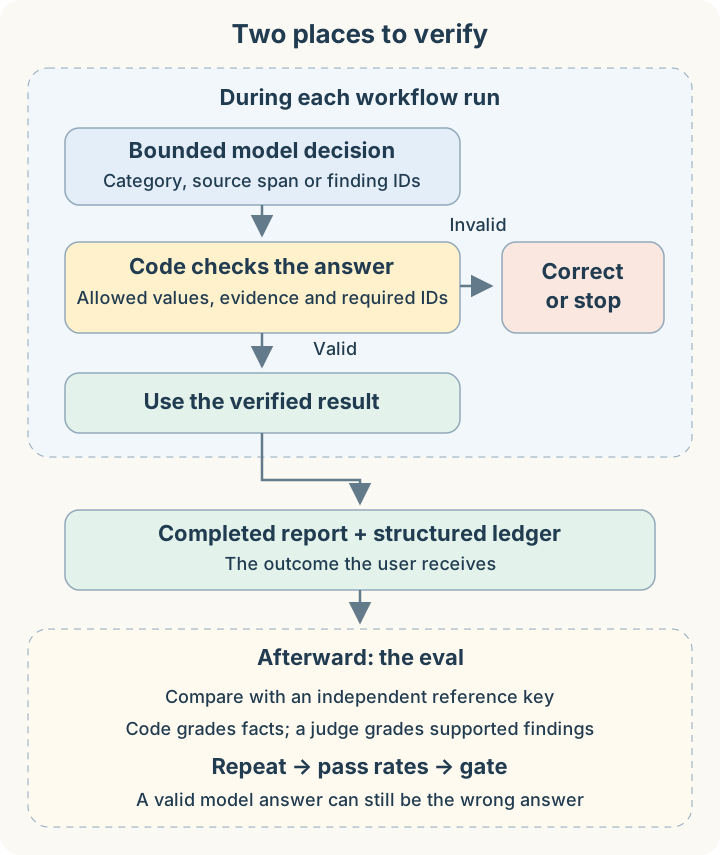
An eval checks the answer after it is written. The workflow also checks each step while it runs, before the next step uses the result. Two kinds of model take part. Jev, TypeSafe AI’s decision model, is a System One model: it answers a multiple-choice question at once, without reasoning step by step first, and gives a probability for each choice. A large language model is used only where code and Jev can’t do the job.
- Code reads each line’s date, merchant and amount. For a line code can’t read, code lists the possible dates and amounts in its text and Jev picks which is which. If Jev isn’t confident, a large language model reads the line, and code confirms the date and amount it returns appear in the line’s own text. In this log, code read every line itself.
- Jev puts each line in a category from a fixed list. Code rejects any answer that isn’t on the list, then applies written rules: withdrawals and transfers stay uncategorized, known merchants get their known category.
- Code removes the duplicate, nets the refund and computes every total. The duplicate is confirmed by the person who runs the analysis, and code only excludes it if it really repeats the line before it. If the totals don’t reconcile, code stops.
- Code writes candidate findings as complete sentences, and a large language model picks three of them.
- Code lays out the report.
Step 4 is the only place a large language model touches the answer here, so it’s worth seeing exactly what goes in and what comes out. Code sends a list of sentences it has already written, each with an ID, and says which IDs are required. This list is shortened; the real one has ten candidates.
{
  "required_evidence_ids": ["budget-2026-08-01-dining_coffee", "change-2026-07-01-2026-08-01-travel", "shopping-coverage"],
  "candidate_evidence": [
    {"evidence_id": "budget-2026-08-01-dining_coffee",
     "statement": "In August 2026, Dining & Coffee was $398.69 against a $260.00 monthly target, $138.69 over target."},
    {"evidence_id": "change-2026-07-01-2026-08-01-travel",
     "statement": "From July 2026 to August 2026, Travel rose by $1,631.82, from $0.00 to $1,631.82."},
    {"evidence_id": "change-2026-07-01-2026-08-01-other",
     "statement": "From July 2026 to August 2026, Other rose by $299.91, from $454.73 to $754.64."},
    {"evidence_id": "shopping-coverage",
     "statement": "Shopping was below its stated monthly target in 3 of 3 reported months. ..."}
  ]
}
The model returns three IDs and nothing else:
{"findings": [
  {"evidence_id": "budget-2026-08-01-dining_coffee"},
  {"evidence_id": "change-2026-07-01-2026-08-01-travel"},
  {"evidence_id": "shopping-coverage"}
]}
Code then checks the answer: three different IDs, all from the list, including every required one. If the answer fails, code tells the model what was wrong and asks again. The report prints code’s own sentences for those IDs. The model writes no text and computes no numbers, so it cannot introduce arithmetic errors by rewriting those sentences. Code’s calculations, sentence templates and selection checks still have to be correct.
In this case code required three findings, so the model’s answer was fully decided. The step exists for logs where fewer findings are required and the model has a real choice to make among the rest. Either way, its choice is checked before it is used.
This is verified, not trusted, applied twice. Code checks each model’s output at the step where it is produced, and the eval checks the finished answer against the reference key.
A check inside the run has limits. Code can establish that a category is allowed or that an extracted amount appears in the source. That does not establish that the category or amount is the right one. The independent reference key supplies that comparison in the eval.
How often is often enough?
A check passes when its pass rate reaches the minimum. For the prompt in Part Three, the minimum was 80%: four runs out of five. That accepts that a model’s answer varies and asks how often it varies.
For the workflow, the minimum is 100%. Code decides every step that has one right answer, so the same input should give the same verified outcome every time, and any failed check is something to investigate rather than a rate to tolerate. After extending the entry-by-entry check to include dates and merchants and fixing the REI merchant, I reran both eval rounds: seven model-and-effort configurations, five runs each, twice. All 70 completed runs passed every graded check, including all 198 lines, and produced identical report text. The suite requires 100% for every graded check.
The recorded workflow runs retain the scorecards, per-run grades and report artifacts for those two rounds.
Those 70 reports establish consistency on this one expense log. They do not prove that every future log will produce the right answer. A separate earlier attempt failed before producing a report. Completion failures matter too, so a release decision should examine them alongside the correctness of completed answers.
The minimum is a statement about how much you’re willing to rely on the result. For low-stakes exploration, where you read every answer anyway, you might accept 80% on a check. An analysis that feeds a decision about money should not.
When to use a judge, and when not to
Use a judge when the property is a judgment: whether findings are supported, whether an explanation is clear, whether an answer follows a required order in prose. Write the rubric with the reference facts in it, so the judge compares rather than guesses.
Don’t use a judge for anything code can read. Totals, counts, yes or no facts and anything in structured output belong to code. A judge asked to check arithmetic is a model checking a model’s arithmetic, which is the problem the eval was meant to solve.
And check the grading itself. In Part Three, several strong models were marked wrong for putting Steam in Shopping, and the mistake turned out to be in my reference key, not in their answers. Reading the failed answers exposed the problem in the grading. The eval is software too.
Where to start with your own
Take one task you rely on. Write down what has to be right in the output, the way the table above does for expenses. Build the reference key by hand for one input. Turn each “has to be right” into a check, and give each check to code unless it truly needs judgment. Then run it five times and look at each check’s pass rate and the failed outputs. Add cases for materially different inputs, and repeat the eval when the prompt, model, reasoning effort or workflow changes. You’ll learn more from those five runs than from any single good-looking answer.